
Swap
Move stablecoins across blockchain networks using swap.
Stablecoin Swap lets you move stablecoins across different blockchain networks without juggling multiple tools or managing complex signing steps manually. Everything from selecting a route to getting it signed and executed happens in one place, so your team can move liquidity across chains quickly and confidently. Vaults supports the Swap feature using LiFI.
If your organisation needs to transfer stablecoins between chains, such as moving USDT from Ethereum to Polygon, the stablecoin Swap handles the routing, security screening, and execution automatically while keeping the same compliance controls and approval policies you already use for standard transactions.
The following key swap capabilities are supported on Vaults:
- Cross-chain swap execution using best-available routing providers.
- Real-time quote fetching with estimated output, route details, slippage, and fees.
- Integrated firewall and approval policies consistent with existing transfer workflows.
- Smart contract risk screening before any swap route is executed.
Refer to the following sections to learn more:
- Configure Routes for swap execution rules and configuration.
- Allowance for approving swap execution of a wallet and token.
Note
- Cross-chain address whitelisting is available exclusively for stablecoin swap transactions. Standard wallet-to-wallet transfers remain restricted to addresses on the same chain.
- For internally whitelisted addresses, the destination wallet name displays as "UNKNOWN" in the History view. It shows correctly in the transaction side panel.
Supported chains and tokens
- Chains: Ethereum (ERC-20 token swap), Polygon, BNB, Base and Tron.
- Tokens: USDC and USDT (Tether ERC-20).
Configure Routes
Vaults use LiFi for route discovery and execution to ensure cross-chain transactions are completed successfully. Only whitelisted wallets, routes, and smart contract addresses are allowed for swap transactions. Owners and Admins can have access to whitelist and modify the route configurations.
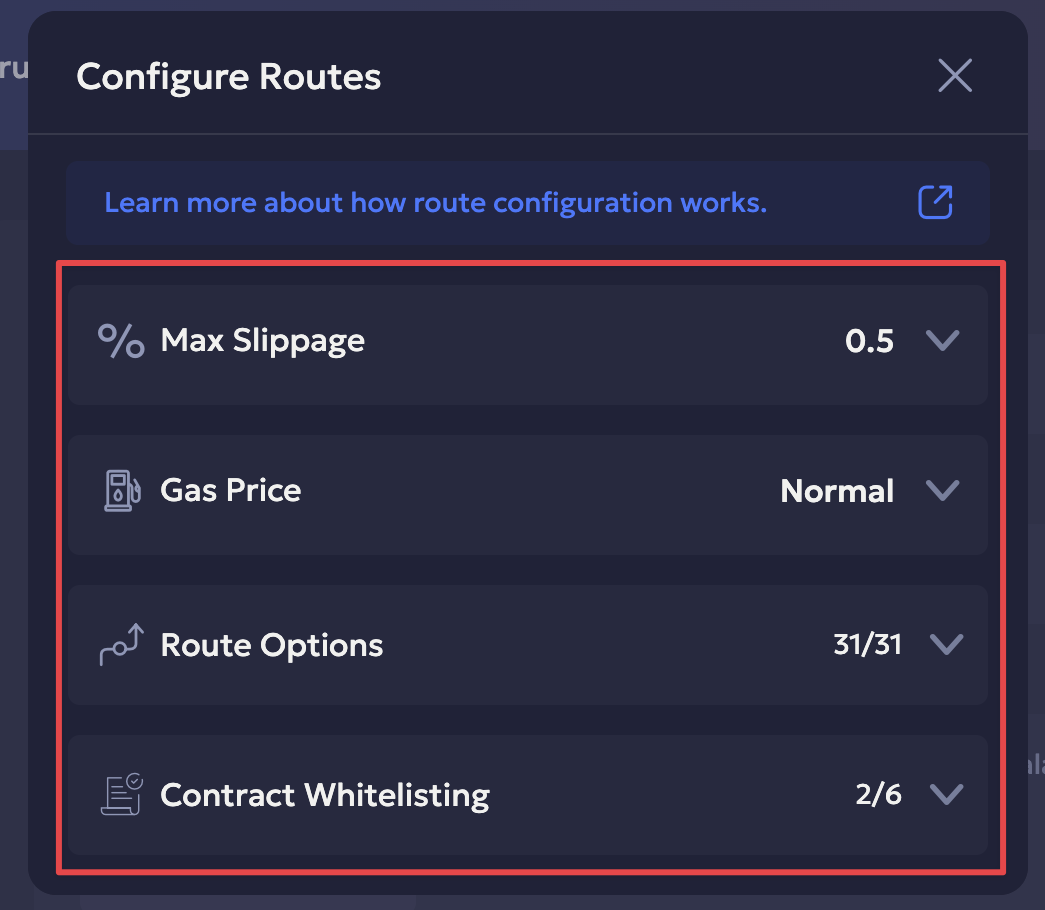
The route configuration is determined by the following:
- Maximum slippage: Determines the maximum price deviation (%), i.e., the maximum price difference from when you submit the swap transaction to when it actually executes. By default, the slippage is set at 0.5%.
- Gas Price: The swap transaction will require sufficient gas price balance to ensure the transaction is executed successfully. It includes transaction network fee cost for the source chain, bridge fee, and the destination chain. You can choose between the low, normal and high values.
- Route Options: The aggregated cross-chains swap routes are supported via LiFi and have automatic address screening via Cube3 and Cvyers.
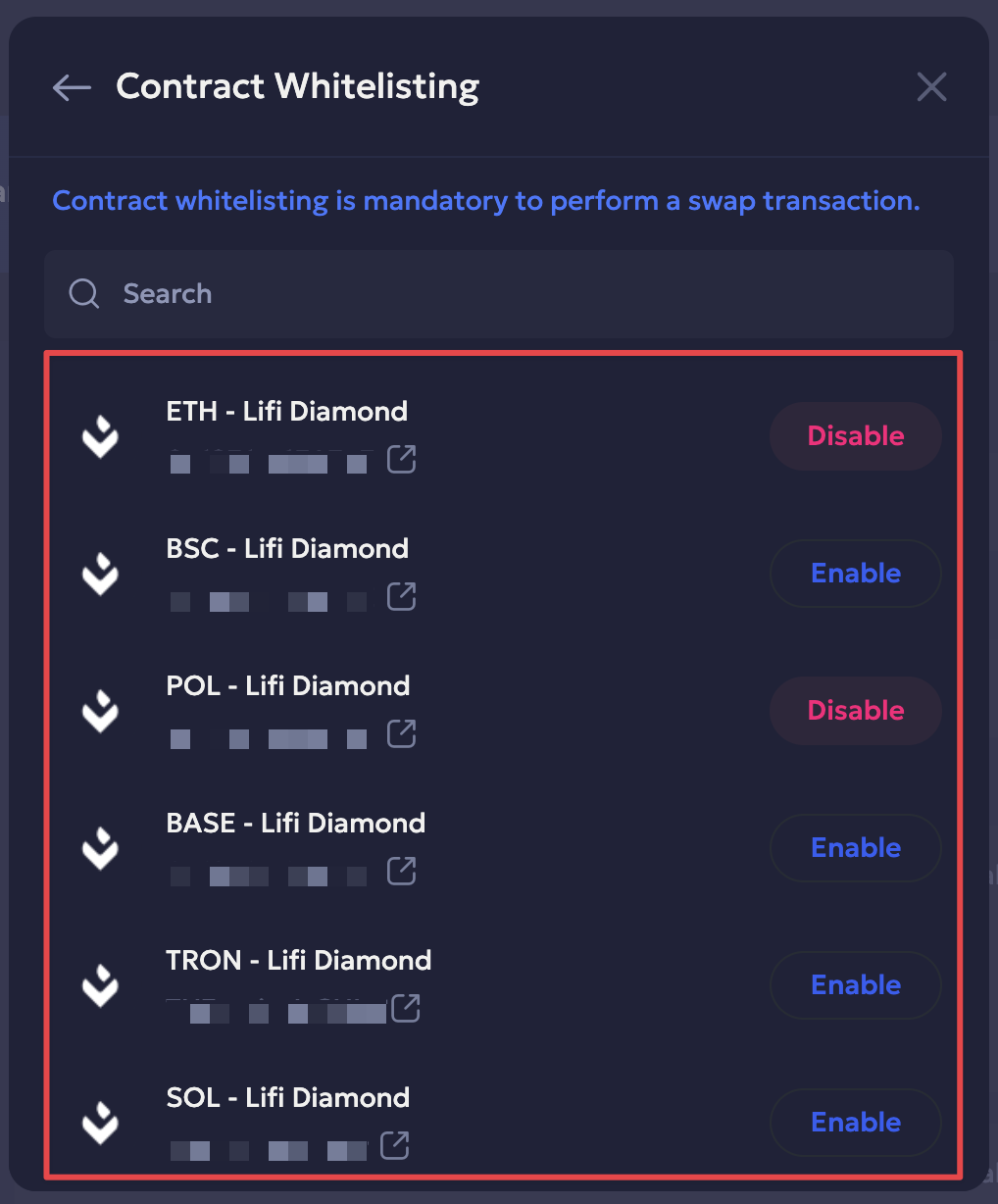
- Contract Whitelisting: It is required to whitelist the smart contract for each swap route before its execution.
Steps to Whitelist Smart Contract
You can whitelist smart contracts to enable stable swap for your Vaults organisation.
Steps to whitelist smart contract address:
-
Navigate to Swaps from Vaults web.
-
Click the Configure Routes option to the top-left.
-
Select the Contract Whitelisting option.
-
Select Enable to enable a smart contract and click Yes, Confirm in the confirmation popup.
-
Enter the 2FA code to confirm.
Swap allowance
The selected swap provider is authorized to spend the selected token from this wallet, up to the approved allowance amount. This step gives the swap provider's smart contract permission to interact with the selected token from your wallet, up to the approved allowance amount.
Once approved, future swaps using the same wallet and token will not require additional authorization unless the allowance is exhausted or revoked.
Steps for token allowance:
- Sign into your Vaults account.
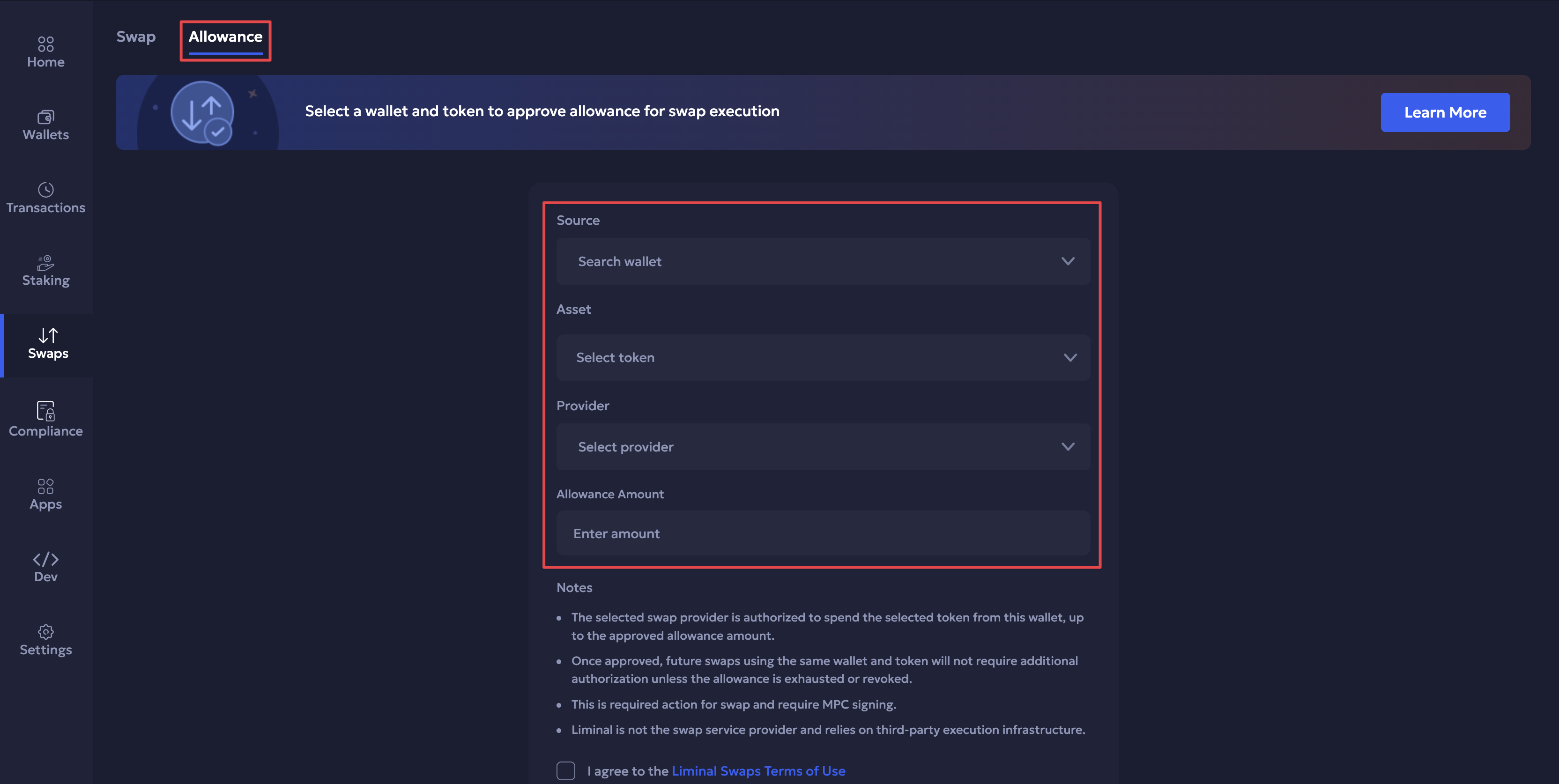
- Navigate to Swaps > Allowance.
- Select the source wallet, asset token, provider and the allowance amount.
- Select the checkbox to agree to the Swap terms of use.
- Click Enable Swap to successfully enable the swap allowance.
Note
- A swap cannot proceed without a valid token allowance. If the allowance approval fails, the swap will be blocked until it is successfully completed.
- The maximum allowance limit is $500K.
Quote Behavior
Swap quotes are fetched in real time and reflect current market conditions, available liquidity, and optimal routing across supported providers.
Swap quote contents
Each quote includes the following information:
- Estimated output amount for the destination token
- Route details, including the bridge and intermediate contracts used
- Smart contract address of the swap provider handling execution
- Slippage tolerance for the transaction
- Estimated fees, including gas and protocol fees
Quote validity
The quotes are valid for 60 seconds from the time they are fetched. If the quote expires before all approvals are completed and the transaction is signed, the user must request a new quote before the swap can proceed. The platform will notify the user when a quote has expired.
Route Filtering
Routes are automatically filtered to exclude any smart contracts that have not been whitelisted in the Vault settings. This means the quotes presented to users only reflect routes that the Vault has approved for use. If no whitelisted routes are available for the requested token pair, no quote will be returned.
Provider Selection
The platform supports Li.Fi as the routing provider. Users can review the route source as part of the quote details.
Note
Swap route configuration is currently supported by LiFi only. Support for Blockdaemon (expand.network) routes for the selected token pair and chains is part of the upcoming release.
Prerequisites
- Destination address whitelisting: You must whitelist the destination wallet address, including for cross-chain address swaps.
- Token allowance whitelisting: You need to approve token whitelisting for the respective wallet. This enables permission for the swap provider's smart contract to interact with the selected token from your wallet.
- Smart contract whitelisting: You must whitelist at least one valid smart contract for the route configuration.
- The source wallet must have enough native coins in the source wallet to cover the network fee.
- You must be in the source wallet’s transaction initiation team to initiate a swap transaction request.
Steps
1. Submit the swap transaction
Refer to the steps to execute a swap cross-chain transaction:
-
Sign into your Vaults account.
-
Navigate to Swaps.
-
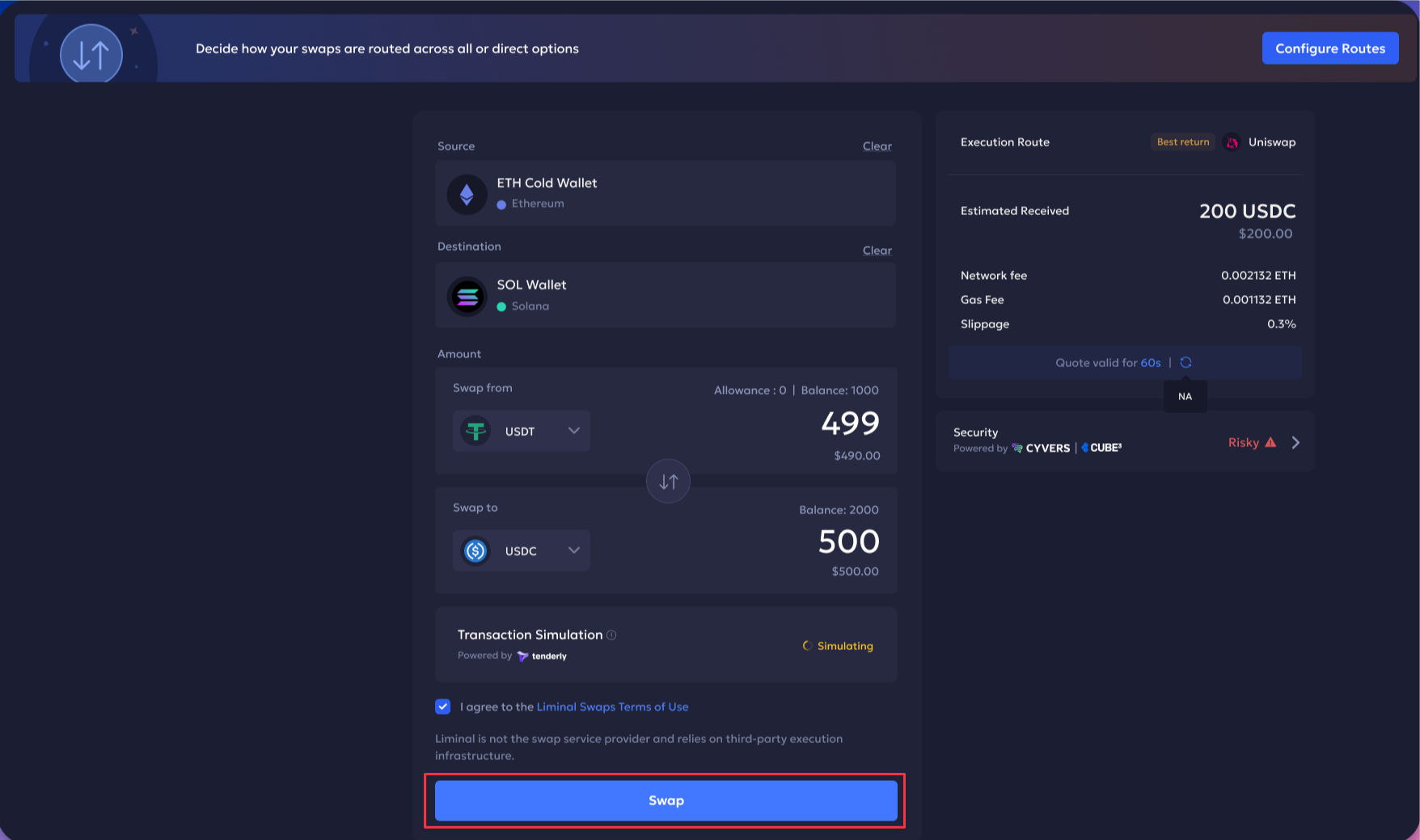
Select the source wallet from the dropdown.
-
Select the destination wallets from the dropdown.
-
Amount:
- Select the token asset type (between USDC & USDT) you want to swap from the source wallet to the token in the destination wallet. Enter the amount you want to swap.
- Verify the quote details: The estimated received amount that is swapped in the destination wallet is converted and shown accordingly. Verify the converted amount, transaction gas fee and slippage for the given quote.
The quote stays valid for 60 seconds. It is updated as per the latest aggregated execution route.
-
Select the checkbox to agree to the terms of services.
-
Click Swap to enable the swap transaction.
-
Enter the required 2FA code to authorize the transaction.
The transaction is successfully submitted. Vaults’ firewall checks the transaction against existing policies and sends required notifications once the request it initiated.
2. Approve the Swap transaction
The transaction needs to be approved by the Signer from Vaults Mobile before it is completed and broadcasted on-chain.
- Sign into your Vaults mobile account.
- Tap the Actions tab to view pending actions.
- Review the required Swap card having the transaction request and select Approve to confirm.
- Enter the required 2FA authentication code to proceed.
Once the transaction is approved by the Signer, the platform tracks the transaction on-chain. After it is successfully executed, the balances are updated for both the source and destination wallets, and the swap status updated in the Transaction History and Audit Logs.
The updated wallet balances are also recorded in the account statement reports.
Error Handling
You may encounter the following errors during a swap transaction. Ensure to mitigate the errors according to the following:
- Ensure to have sufficient wallet balance in native coin to cover the swap transaction fee.
- In case of any network and provider errors encountered during the quote retrieval process or during swap transaction execution, the user is prompted to retry.
- A swap cannot proceed in case of failures like allowance approval, smart contract address screening or firewall policy approval. Ensure to go through the required prerequisites to mitigate the required errors.
Updated 2 months ago