
History
The History page provides a comprehensive view of all ongoing, pending, and failed transactions, and their associated metadata. You can quickly review and verify transaction activities at any given time to maintain a clear audit trail of all financial movements.
You can navigate from:
- Transactions > History, and
- Wallets > select wallet > Wallet Details > History.
Navigate to the Transaction Details Panel to view:
- Details: Displays comprehensive information about the selected transaction, including its history, compliance, status, and sub-status.
- Timeline: Shows a chronological sequence of events triggered during the transaction.
Here is the following transaction history metadata listed within the comprehensive view:
| Field | Description | Values | Example |
|---|---|---|---|
| Asset | The token used in the transaction | Supported token list | ETH |
| Type | Whether the transaction was sent or received | Send, Receive | Receive |
| Amount | Total value in USD and transaction amount | USD (crypto amount + symbol) | $250.00 (0.10 ETH) |
| Transaction Hash | Unique ID of the blockchain transaction | Alphanumeric hash (chain specific) | 0xabc123…789def |
| From | Sender name and wallet address | Wallet name + address | Wallet A (0x1234abcd5678efgh) |
| To | Receiver name and wallet address | Wallet name + address | Wallet B (0x9abc5678def01234) |
| Time | When the transaction transpired | Date and time | 2025-08-14 21:45 UTC |
| Status | Current transaction state | Success, Pending, Rejected | Success |
Table: Transaction History page metadata
Actions
You can perform the following actions to customise the transaction history view.
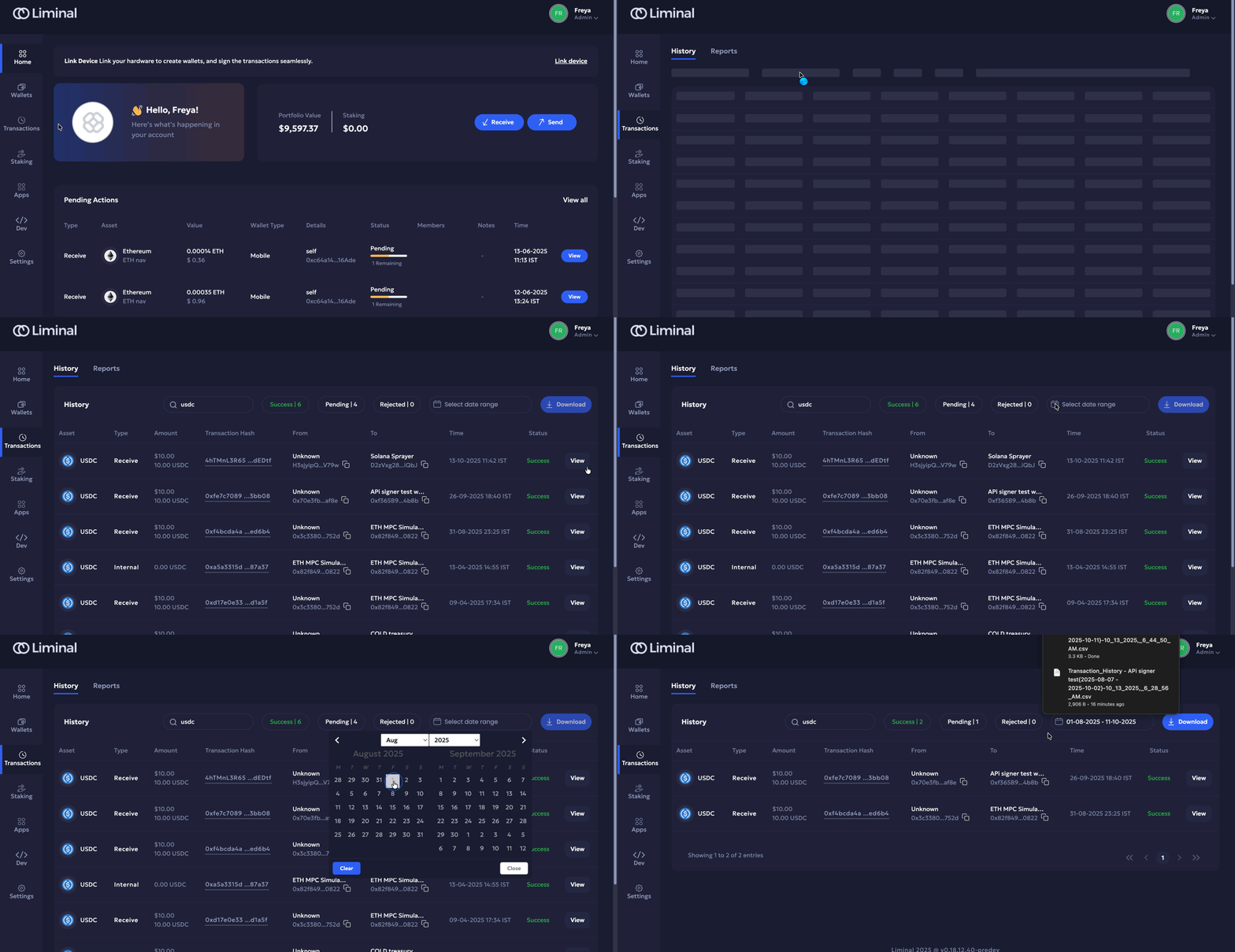
Search & Filter Transaction History
- Use the search bar to search for required transactions. Example keywords: Receive, Send, Asset, etc.
- Use filters to check the following:
- Transaction status: Click either the Success, Pending, or Rejected buttons to filter transactions based on their statuses. This metric also shows the total number of items in your filtered list.
- Transactions in selected period: Select a date range from the picker to filter transactions from within the specified period using the calendar.
Download Transaction History (CSV)
Select:
- Select a date range from the calendar picker.
- Click Download to download the transaction holding statement.
Transaction History Panel
The transaction history side-panel provides an overview of all the latest transactions.
It includes the following tabs:
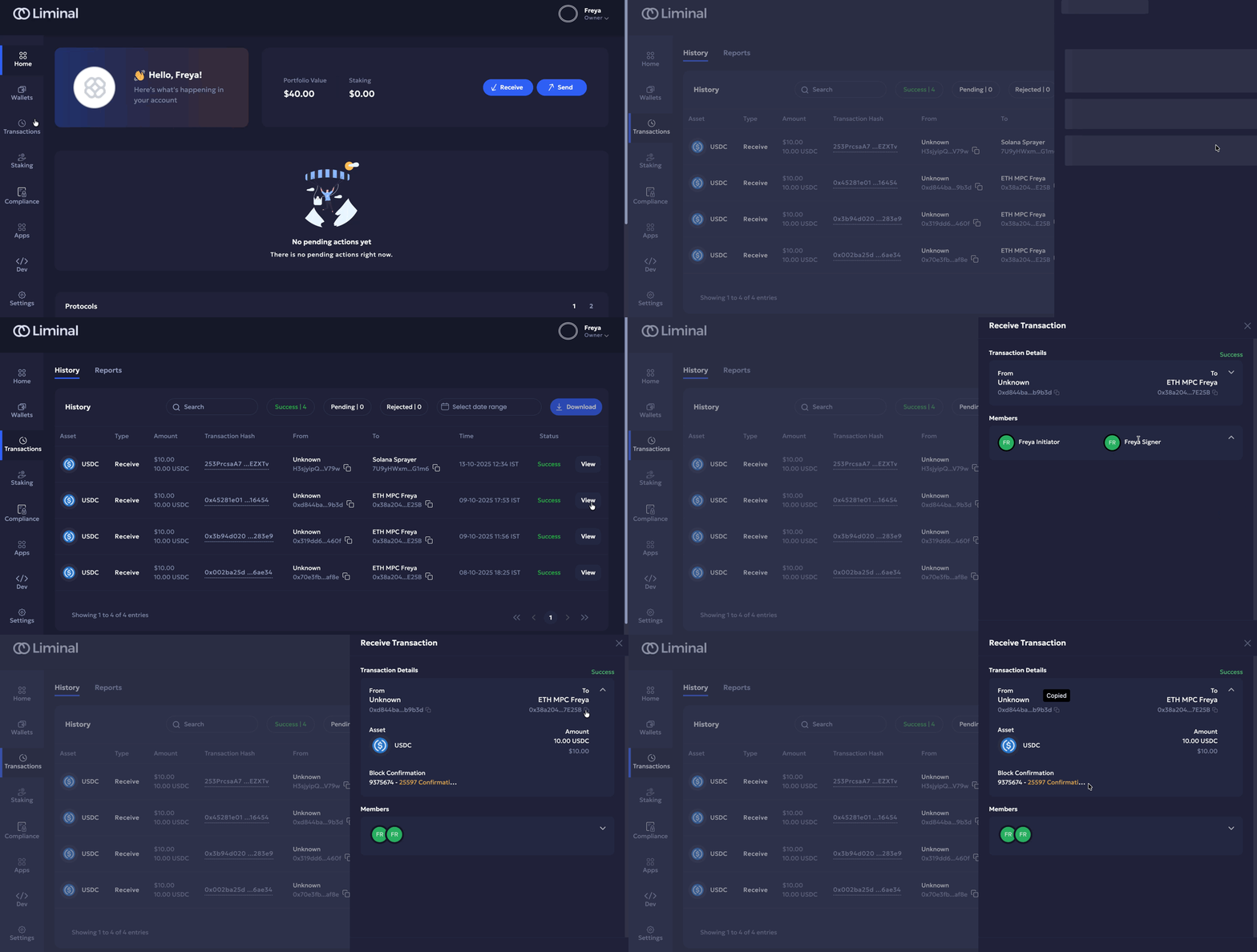
- Details: Displays comprehensive information about the selected transaction, including its history, compliance, status, and sub-status.
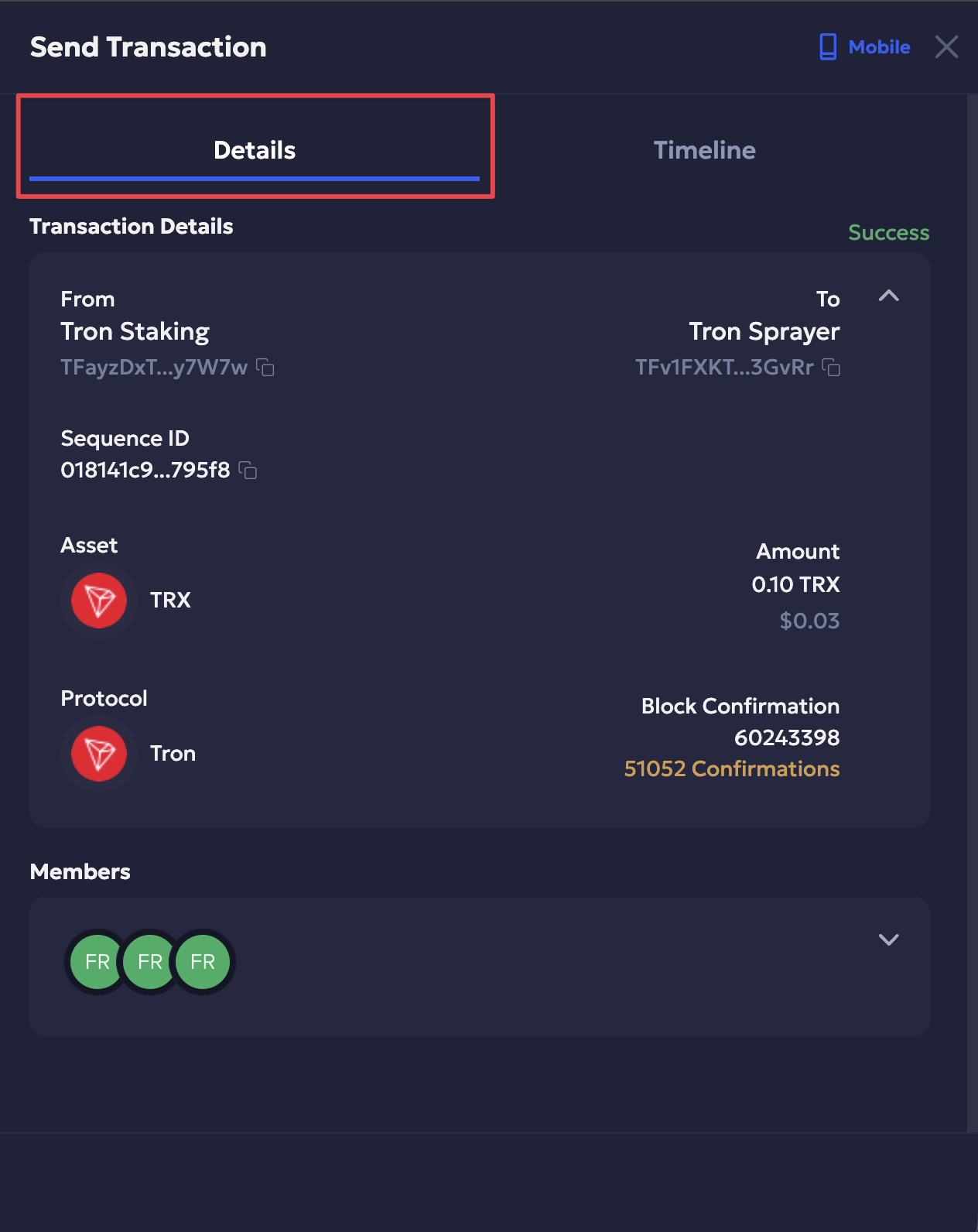
- Timeline: Shows a chronological sequence of events triggered during the transaction.
You can access it and check the history panel in the following ways:
- Navigate to Transactions on your Liminal Vaults account.
- Click View to the right of a required transaction row to bring up the transaction details panel.
Details
The Details tab includes the following transaction metadata:
| Syntax | Description |
|---|---|
| Transaction Type | Indicates whether the transaction is a Send or Receive. |
| Signing Type | Device used for signing (e.g., mobile device, hardware device) |
| Primary Status | Overall state of the transaction (e.g., Success, Pending, Rejected) |
| Secondary Status | Additional status context (e.g., awaiting approval, in review, failed, etc.) |
| Transaction Details | |
| From | Sender name and wallet address. |
| To | Recipient name and wallet address. |
| Asset | The token or cryptocurrency used. |
| Amount |
|
| Protocol | The protocol name of the native coin or token transferred in a transaction. |
| Block Confirmation | The block confirmation number and the total block confirmations taken to finalize the transaction. |
| Members | All members involved in the transaction (initiator, approver, signer) |
| Firewall Details | Firewall policies applied to the transaction. |
| Compliance Details | Compliance checks applied (e.g., transaction risk) |
Table: Transaction Details panel metadata
Timeline
Displays a chronological list of all user-initiated events triggered during a transaction. Each event is shown as a timeline card and includes the following details:
- Event & Description: The name of the event and a brief explanation of what occurred.
- Timestamp: The exact time the event took place.
- User & IP: The user who performed the action and their IP address.
Recorded Events
The following transaction events are recorded for the transaction types:
| Transaction Event | Description | User Role |
|---|---|---|
| Transaction Initiate | Transaction initiated in Pending state. | First Initiator |
| Transaction Signed | Transaction Signed. | First Initiator, First Signer, Second Signer |
| Transaction Rejected | Transaction Rejected — rejected in Initiation/Approval/Signing state. | Rejection |
| Transaction Event | Description | User Role |
|---|---|---|
| Transaction Initiate | Transaction initiated in Pending state. | First Initiator |
| Transaction Signed | Transaction Signed. | First Signer, Second Signer |
| Transaction Rejected | Transaction Rejected — rejected in Initiation/Approval/Signing state. | Rejection |
| Transaction Event | Description | User Role |
|---|---|---|
| Transaction Initiate | Transaction initiated in Pending state. | First Initiator |
| Transaction Approved | Transaction initiated — Initiator Approved. | Approver |
| Transaction Approval Added | Transaction approved in Firewall state. | Firewall Approver (Firewall Quorum Member) |
| Transaction Signature Added | Transaction Signed. | Signer |
| Transaction Rejected | Transaction Rejected — rejected in Initiation/Approval/Signing state. | Rejection |
Use Cases
Transaction history is recorded for the following use cases:
Wallet Transaction History
You can check a wallet’s transaction history, including Sprayer wallets.
Follow the steps below:
-
Navigate to Wallets on your Liminal Vaults account.
-
Select the required wallet transaction to navigate to the wallet profile.
-
Click the History tab on the left navigation bar to check the transaction history.
-
Click View to the right of a required transaction row to bring up the transaction details panel.
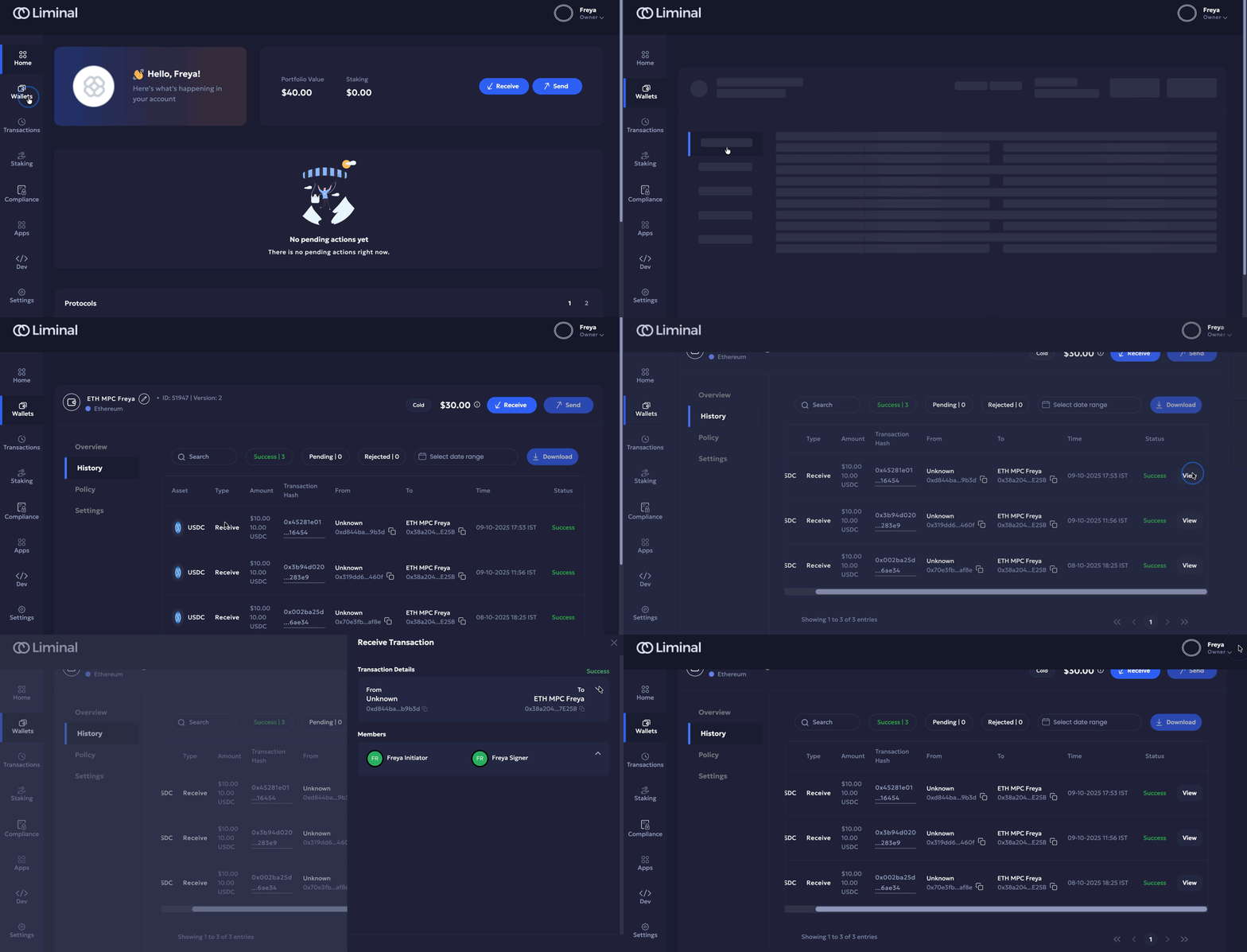
Transaction history sidepanel view for a Cold wallet
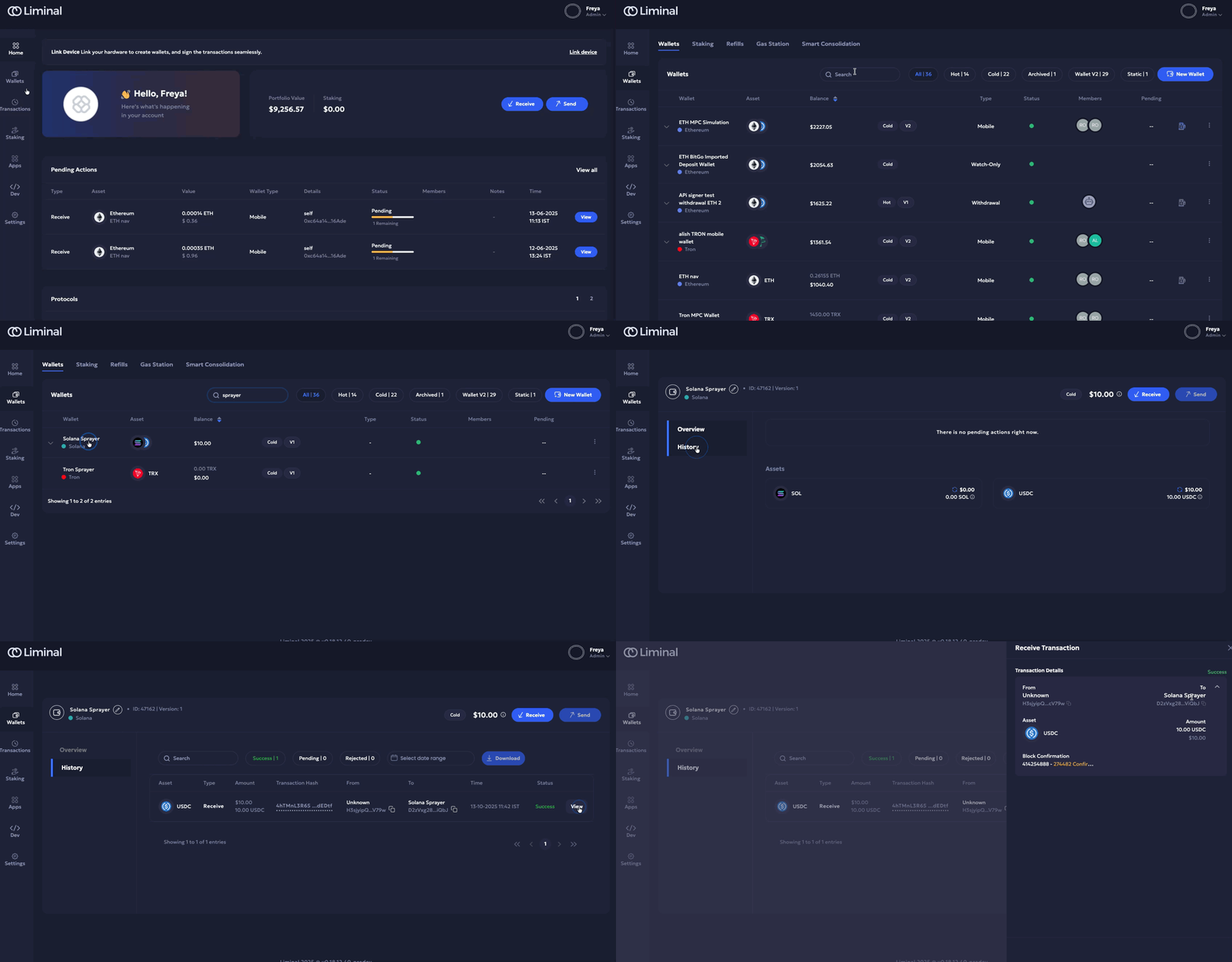
Transaction history view for a Solana sprayer wallet
Gas Station transaction history
Gas Station transaction history is available for users to verify and manage their gas station transactions.
The following metadata is available for checking gas station transaction history:
| Field | Description |
|---|---|
| Wallet | The wallet involved in the transaction |
| Asset | The token used in the transaction |
| Type | The type of transaction (e.g., deposit, withdrawal, transfer) |
| Amount | The value of the transaction |
| Transaction ID | Unique identifier of the transaction |
| Address | The destination or source blockchain address |
| Time | Transaction time |
| Status | Current transaction state (e.g., pending, completed, failed) |
Table: Gas Station history metadata
Follow the steps below:
- Navigate to Wallets on your Liminal Vaults account.
- Click Gas Station to proceed to the required page.
- Click History to switch to the gas station transaction history tab.
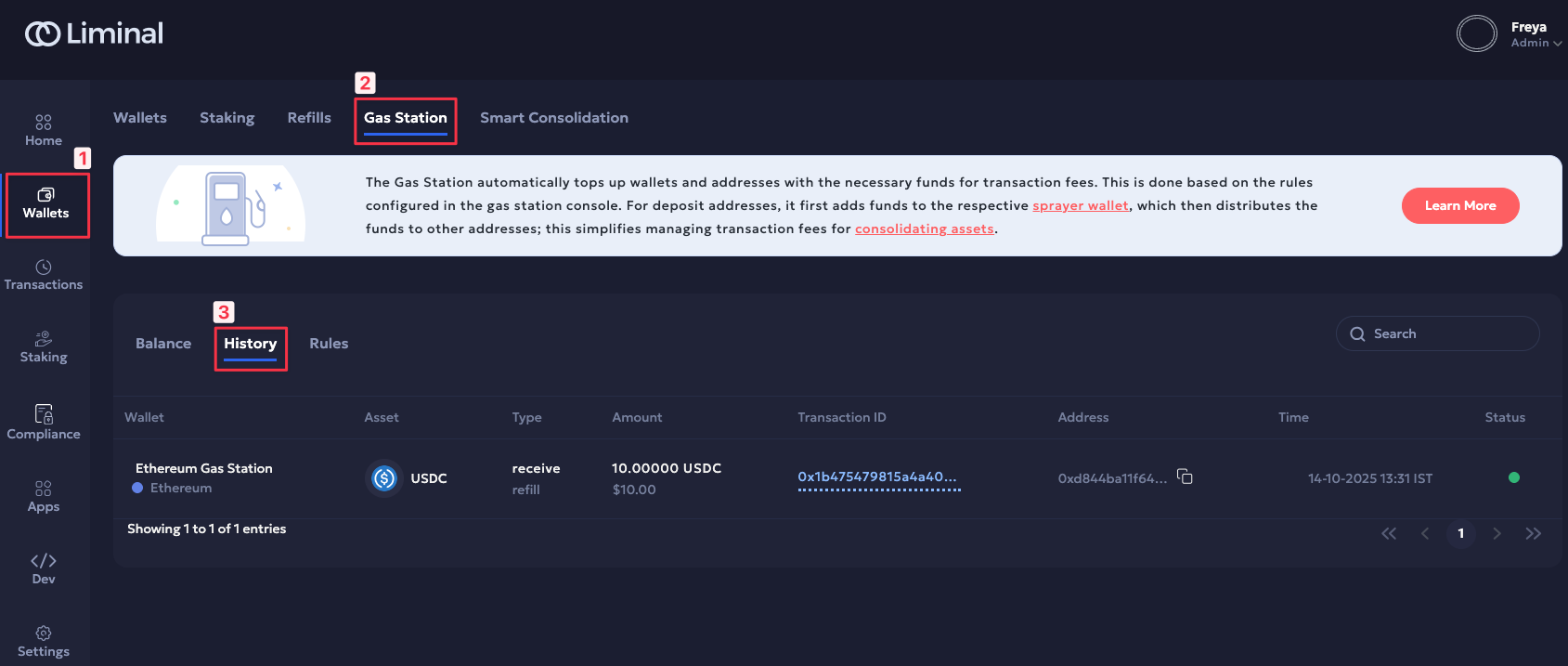
Gas Station history view
Internal transaction history
Transactions that are executed using wallets available on your Liminal Vaults profile are internal. These are recorded in the History page.
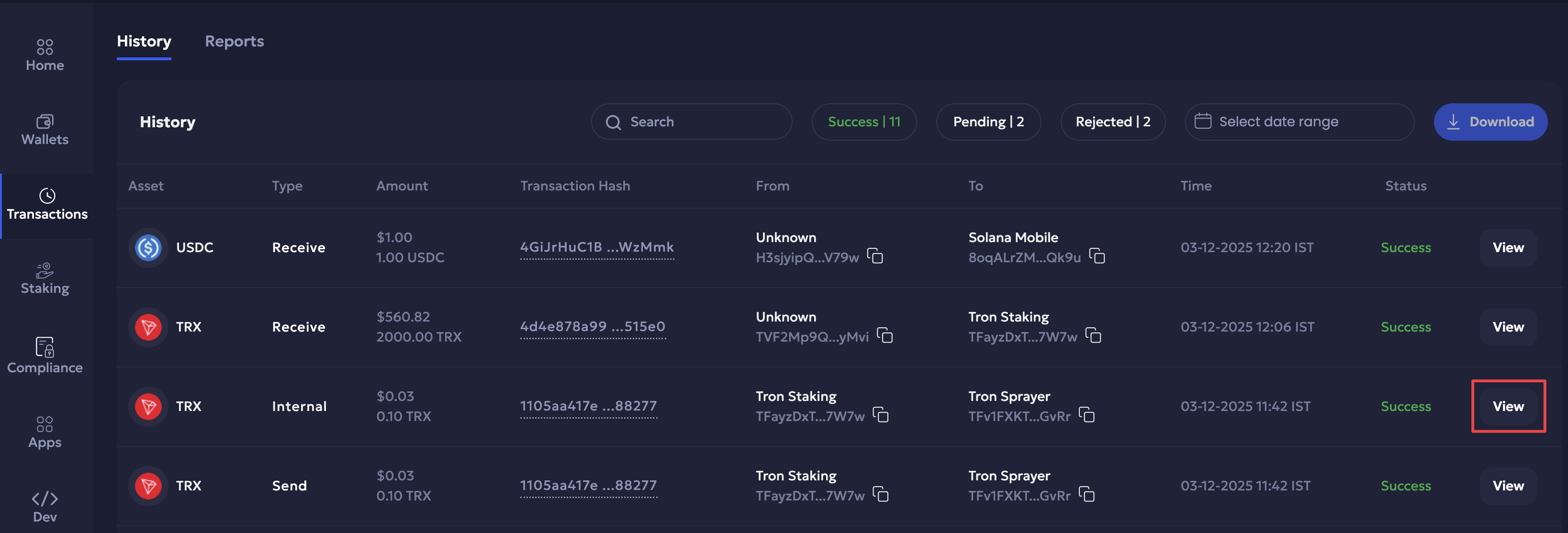
Updated 5 months ago